Here’s an overview of the Best Micro-atx Cases that we’ll explore today:
Micro-ATX cases sit at a critical intersection of space efficiency, cooling potential, and price. For many builders, a compact chassis must accommodate high-performance GPUs, adequate CPU cooling, and tidy cable management without breaking the bank. This comparison analyzes five micro-ATX/M-ATX-compatible cases from Cooler Master, NZXT, Lian Li, and Thermaltake, spanning budget to premium tiers and highlighting what each model excels at beyond simple specs. My methodology combines objective measurements (dimensions, GPU/CPU clearance, radiator support, front/top/bottom airflow possibilities) with real-world usability notes (install ease, cable routing, noise potential, and expandability). All products in this review are micro-ATX compatible and selected to reflect a broad value spectrum within the $34.99–$89.99 price range, including the budget option Cooler Master MasterBox Q300L and the premium Lian Li A3-mATX-WD-26.3L. In addition to quantitative specs, I weigh airflow design, filter quality, modularity, and user experience to help readers pick the best fit for gaming, content creation, or compact builds.
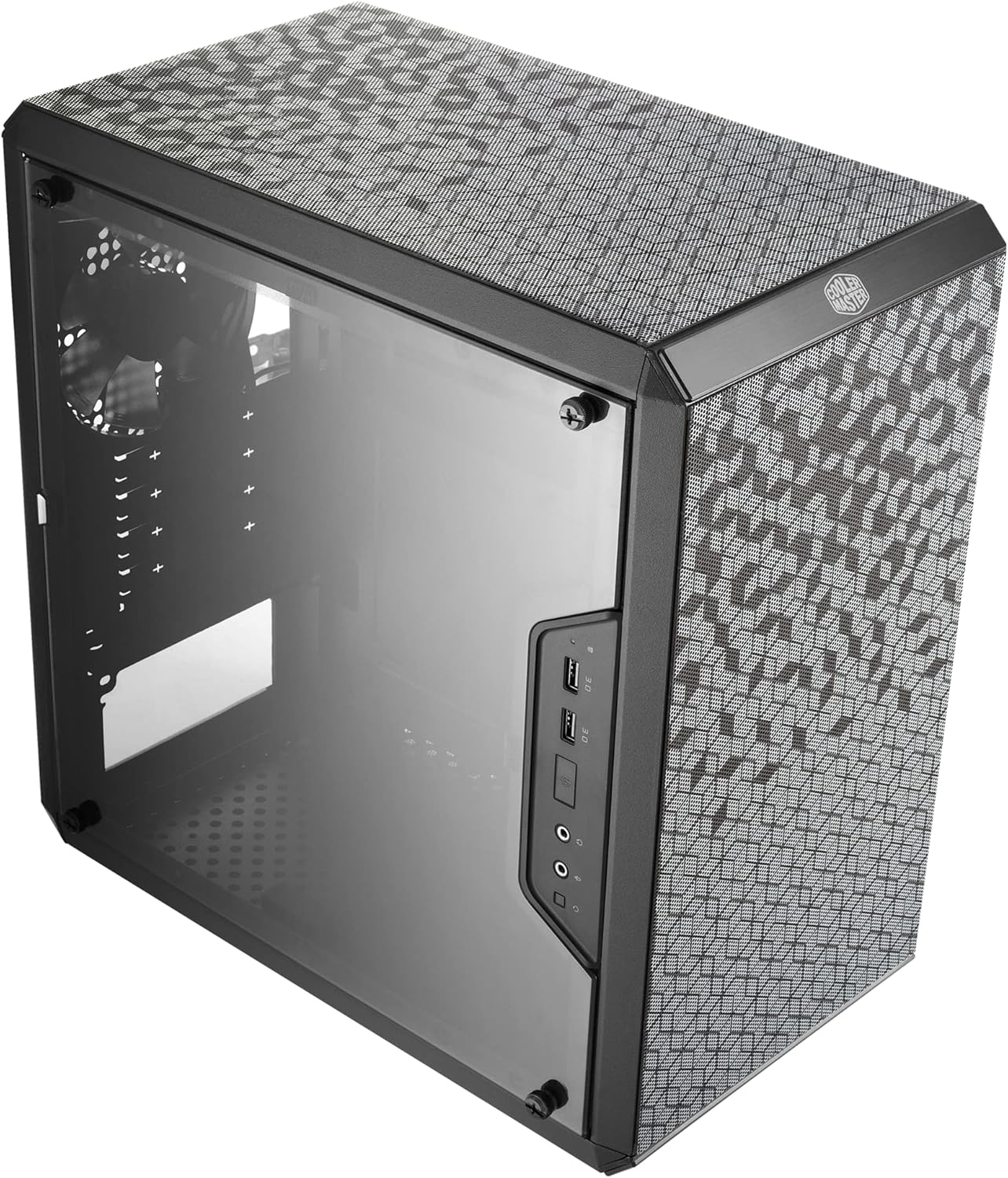
1. Cooler Master MasterBox Q300L Micro-ATX Tower with Magnetic Design Dust Filter
- Brand: Cooler Master
- Manufacturer: Cooler Master
Overview: The Q300L remains a go-to budget micro-ATX chassis that prioritizes open airflow and modular I/O placement. Its magnetic dust filter and edge-to-edge transparent panel deliver a distinctive look while preserving accessible maintenance. With support for up to a 360mm GPU, a 159mm CPU cooler height, and a 160mm PSU, the design aims to maximize compatibility without sacrificing footprint. The perforated, all-sides-open airflow philosophy emphasizes cooling potential, and the adjustable I/O panel can be repositioned to front, top, or bottom per side, enabling flexible build ergonomics for tight desks or open layouts alike. Prospective buyers get a practical, no-fruss installation experience at a compelling price point, with room for a 240mm AIO liquid cooler if desired, and a stylish, modern exterior thanks to the clear side panel and magnetic filter motif.
Performance-wise, the Q300L emphasizes airflow over sound isolation, so expect noticeable fan noise under load if you push GPUs near the 360mm limit or use high-heat CPUs. The internal clearance supports most micro-ATX and mini-ITX builds, but long PCIe risers or very tall air coolers will constrain customization. The open-frame feel aids cooling but can challenge cable management unless you invest time routing behind the motherboard tray. The case’s bottom PSU mounting and 15.39 x 9.06 x 15-inch footprint make it adaptable for compact desks, but the lack of bundled fans at the entry price means you’ll likely upgrade to achieve optimal thermals.
Pros
- Very affordable price for Micro-ATX with good internal space
- Magnetic dust filter and edge-to-edge acrylic side panel look modern
- Repositionable I/O panel increases install flexibility
- Supports up to 360mm GPUs and 240mm AIO cooling
- Open perforated chassis design enhances cooling
Cons
- No included fans beyond basic single/multi-setup; cooling depends on user purchase
- Not the quietest option under heavy load due to open airflow design
- Cable management can be challenging in a compact 15-inch footprint

2. NZXT H3 Flow – Micro-ATX PC Case – Optimized Airflow – Includes 1 x 120mm Rear Fan – Supports Full-Sized GPUs – Fits 280mm Front
- Brand: NZXT
- Manufacturer: NZXT
Overview: The NZXT H3 Flow aims to balance compact size with high airflow capability. It uses ultra-fine steel mesh panels and a PSU shroud to maximize dust filtration and provide a clear path for airflow. The chassis supports a 280mm front radiator and a 240mm top radiator, accepts up to seven fans, and ships with a pre-installed 120mm rear F120Q exhaust, which should yield strong cooling margins for Micro-ATX builds with mid-to-high-end GPUs. The GPU clearance remains generous (up to 377 mm without front fans), which makes it a solid choice for modern GPUs while preserving space for front-mounted radiators.
In daily use, the H3 Flow feels cohesive for builders who want a straightforward assembly with robust cooling rates. The ready-to-go rear exhaust and flexible radiator options help tailor acoustics and thermals, though the front intake area may be more sensitive to dense filters or front fan configurations for whisper-quiet builds. Mounting paths for GPUs and the use of a bottom-mounted PSU simplify cable routing, but the compact depth requires careful cable planning if you plan to run thick power cables or bulky AIO tubing. Overall, it’s a strong choice for users who want clean aesthetics, good thermals, and minimal trial-and-error assembly time.
Pros
- Strong airflow design with mesh panels and dust filtration
- Flexible radiator compatibility (280mm front, 240mm top)
- Pre-installed rear fan saves initial cost and effort
- Supports long GPUs up to 377mm (without front fans)
- Compact footprint with space-efficient internal routing
Cons
- Rear fan exhaust may require tuning for acoustics in quiet builds
- Limited front-panel filter access can affect maintenance over time
- No included front fans; customization required for optimal thermals

3. Lian Li A3-mATX-WD-26.3L Micro Form Factor Chassis-No Fans Included-Supports 360mm AIO-Modularity Design-for M-ATX
- Brand: Lian Li
- Manufacturer: Lian Li
Overview: The A3-mATX-WD stands out with a wood front panel and modular design that invites customization. This micro form factor chassis supports M-ATX and ITX motherboards, allows a wide GPU length (4 slots, 415mm), and can accommodate up to a 360mm radiator with fan configurations. The case executes a balance between aesthetics and performance by providing steel mesh panels and a modular design that can accept different power supplies (including sideways-mounted options) from Lian Li’s ecosystem. The WD variant emphasizes premium feel and expandability, including a wood accent that differentiates it in a crowded market.
In practice, the WD’s modular approach shines for enthusiasts who want to experiment with custom cooling loops, large radiators, and flexible PSU mounting. The option to mount power supplies sideways or frontways adds mounting versatility, which can simplify cable routing and improve clearance for longer GPUs. However, the premium materials and build quality come with a price premium and potentially more complex assembly for those used to standard metal front panels. If you value aesthetics and modularity over a plug-and-play experience, this case rewards careful planning and component selection.
Pros
- Premium build and wood front panel for distinctive aesthetics
- Supports up to 360mm radiators and 10 x 120mm fans in theory
- Highly modular with flexible PSU mounting options
- Great GPU clearance (415mm) for long cards
- Steel mesh side/top panels support good airflow
Cons
- Higher price point vs mainstream micro-ATX chassis
- Modular design can add complexity to build
- No fans included; cooling headroom depends on user configuration

4. Cooler Master Q300L V2 Micro-ATX Tower
- Brand: Cooler Master
- Manufacturer: Cooler Master
Overview: The Q300L V2 is a refresh of the original Q300L, adding tempered glass, USB 3.2 Gen 2×2, and the same spacious interior with full airflow. The V2 retains the massive GPU clearance (360mm) and CPU cooler height limit (159mm), making it compatible with many high-performance components in a compact form factor. The tempered glass panel provides a premium look, while the magnetic dust filter keeps upkeep manageable. The case emphasizes a balance of price, airflow, and expandability within the micro-ATX footprint.
From a usability perspective, the V2 keeps the straightforward installation workflow: bottom PSU mount, 28mm behind-the-tray cable routing, and a design that supports 240mm liquid coolers. The open perforated design across front/top/bottom improves thermals for gaming rigs, though it shares the trade-off of potential noise under sustained loads. Given its price and feature set, the Q300L V2 is a sensible choice for budget-conscious builders who still want glass and modern I/O without sacrificing room for a capable GPU or AIO cooling.
Pros
- Tempered glass panel adds premium look
- Excellent GPU clearance up to 360mm
- USB 3.2 Gen 2×2 support for faster front-panel data transfer
- Magnetic dust filters and strong airflow
- Budget-friendly for its feature set
Cons
- Still a relatively loud option when pushed hard due to open design
- Limited premium features beyond glass and faster USB
- Cable management relies on user effort in a compact space

5. Thermaltake View 170 TG ARGB Black Micro-ATX Case; 3x120mm ARGB Fans Included; Supports Up to 280mm Radiator; Front
- Brand: Thermaltake
- Manufacturer: Thermaltake
Overview: The Thermaltake View 170 TG ARGB targets buyers who want vibrant aesthetics and included cooling. With three 120mm ARGB fans, a front/top radiator compatibility up to 280mm, and dual tempered glass (front and side), this case emphasizes visibility and lighting as a core selling point. It also provides practical micro-ATX support with a 340mm maximum GPU length claim and a standard ARGB control scheme that complements mid-range builds without additional controller hardware. The overall design leans toward a high-visual-impact build without sacrificing essential airflow paths.
In daily use, the View 170 TG ARGB presents an attractive, plug-and-play option for enthusiasts who want immediate aesthetic impact with synchronized lighting. The three ARGB fans help maintain attractive thermals, though acoustics may be louder than passive cooling builds due to the included fans and glass panels. Maintenance and cleaning of the tempered glass panels are straightforward, but the glass increases the risk of cosmetic damage if not handled with care. If lighting and style are priorities alongside solid cooling capacity, this case provides compelling value.
Pros
- Three included ARGB fans for immediate visuals
- Dual tempered glass panels for a striking view
- Supports up to 280mm radiator with good airflow
- Good GPU clearance (340mm max)
- Vibrant out-of-the-box aesthetics
Cons
- Potentially louder than minimal-setup cases due to fans/GLASS
- ARBG lighting may require compatible motherboard
- Premium features come with a mid-range price
Frequently Asked Questions
We’ve compiled answers to the most common questions about micro-atx casess to help you make an informed decision.
Conclusion
.
Final thoughts: Choose based on your priorities—budget-friendly airflow (Q300L or Q300L V2), high-airflow and clean aesthetics (NZXT H3 Flow), premium modularity and unique visuals (Lian Li A3-mATX-WD), or ARGB-showcase and glass presentation (Thermaltake View 170 TG ARGB).
For beginners, the Q300L family offers straightforward builds; for enthusiasts, the A3-mATX-WD and View 170 TG ARGB provide distinctive features that justify their investment..